

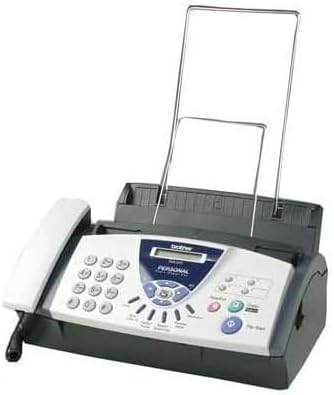
Brother FAX-560 Personal Plain Paper Fax, Phone, and Copier
Product details
| Management number | 214870788 | Release Date | 2026/04/12 | List Price | $104.00 | Model Number | 214870788 | ||
|---|---|---|---|---|---|---|---|---|---|
| Category | |||||||||
Amazon.com The Brother PPF560 provides several services, combining a plain-paper personal fax machine with telephone and copy functions. It sports a compact design with bold, clearly marked operating features and is equipped with a convenient telephone handset. It also has a 50-page standard paper cassette tray. Additional advantages include the copy function, which lets you make up to 99 copies at a time, and the 50-number memory for automatic dialing. We set up the Brother PPF560 in minutes without reference to the owner's manual, thanks to a simple design and intuitive operation. Still, to get the benefits of extensive features, we recommend following Brother's well-detailed instructions for programming in its thorough manual. You'll also need that information to remotely retrieve messages, pages, and faxes. We also recommend perusal of the guide for setting up the fax unit on lines with an external answering machine or with numbers that roll over. Note that phone lines using call waiting or voice mail may run into trouble operating this fax unit. The handset is very lightweight and tapered, and the automatic fax-phone switch lets you make calls and receive faxes through the same phone line. The fax unit lets you know when you have a voice call by emitting double rings. The receiver delivers clear, clean sound. The unit supports caller ID and distinctive ring (when you subscribe through your phone service provider). The automatic document feeder can accommodate 10 pages at a time. The 16-digit LCD displays clear, bright numbers and messages. The ring volume is adjustable from mute to loud, which is fortunate, because the PPF560 has a jarring tone. The phone index for alphabetical search of stored numbers is a great convenience, as is the automatic redial, delayed transmission and hold buttons. Making copies takes the click of one button; enlargements and reductions must be keyed in. The Brother PPF560 is supported by a 90-day warranty. --Barbara PricePros:Remote access to faxes and messages Unique ring identifies incoming voice calls Copier capabilities Cons:May conflict with some phone services Some functions take several steps to program You can make up to 99 copies but the unit holds only 50 sheets From the Manufacturer This personal plain paper fax, phone, and copier stores up to 25 pages for out-of-paper reception. Features include a 10-page document feeder, 50-sheet paper tray, 54 station auto dials, convenience copying, Quick Scan, broadcasting, and a 150-page print cartridge. Automatic fax/telephone switching lets you receive fax and voice calls on a single line.
- 10-page auto document feeder
- 50-sheet paper cassette
- 512 KB memory stores up to 20 pages
- 50 auto-dial locations
- Copy function can make up to 99 copies
| UPC | 012502565031 |
|---|---|
| Brand | Brother |
| Color | white |
| Duplex | Automatic |
| Ink Color | Black |
| Model Name | FAX 560 |
| Paper Size | 8.5 inches |
| Resolution | 203 x 203 dpi |
| Item Weight | 8.6 Pounds |
| Print media | Paper (plain) |
| Manufacturer | BROTHER |
| Model Number | PPF560 |
| Model Series | 500 |
| Printer Type | Thermal |
| Scanner Type | Sheetfed |
| Series Number | 500 |
| Warranty Type | limited warranty |
| Control Method | Voice |
| Number of Trays | 1 |
| Processor Count | 1 |
| Total Usb Ports | 1 |
| Number of Drivers | 1 |
| Dualsided printing | Yes |
| Hardware Interface | USB |
| Maximum Media Size | Legal (8.5 x 14 inches) |
| Total USB 20 Ports | 1 |
| BW Pages per Minute | 15 ppm |
| Printer Output Type | Monochrome |
| Output sheet capacity | 50 |
| Maximum Copies Per Run | 99 |
| Maximum Sheet Capacity | 50 |
| Printer Connectivity Type | USB |
| Additional Printer Functions | Fax |
| Global Trade Identification Number | 00012502565031 |
| Maximum Copy Speed Black and White | 3 ppm |
| Other Special Features of the Product | Auto Document Feeder |
| Maximum Copy Resolution Black and White | 300 dpi |
| Maximum Print Resolution Black and White | 300 dpi |
Bestseller ranking
Storage Drawer Units


Customers who viewed this product also viewed
Fax Machines




Correction of product information
If you notice any omissions or errors in the product information on this page, please use the correction request form below.
Correction Request Form