

Elecom TB-A20MFLAPNS Protective Film for iPad Pro 11 4th 3rd 2nd 1st Generation iPad Air 5th 4th Generation Paper Texture Letter Smooth Anti-Reflective Film
Product details
| Management number | 212352896 | Release Date | 2026/04/06 | List Price | $14.72 | Model Number | 212352896 | ||
|---|---|---|---|---|---|---|---|---|---|
| Category | |||||||||
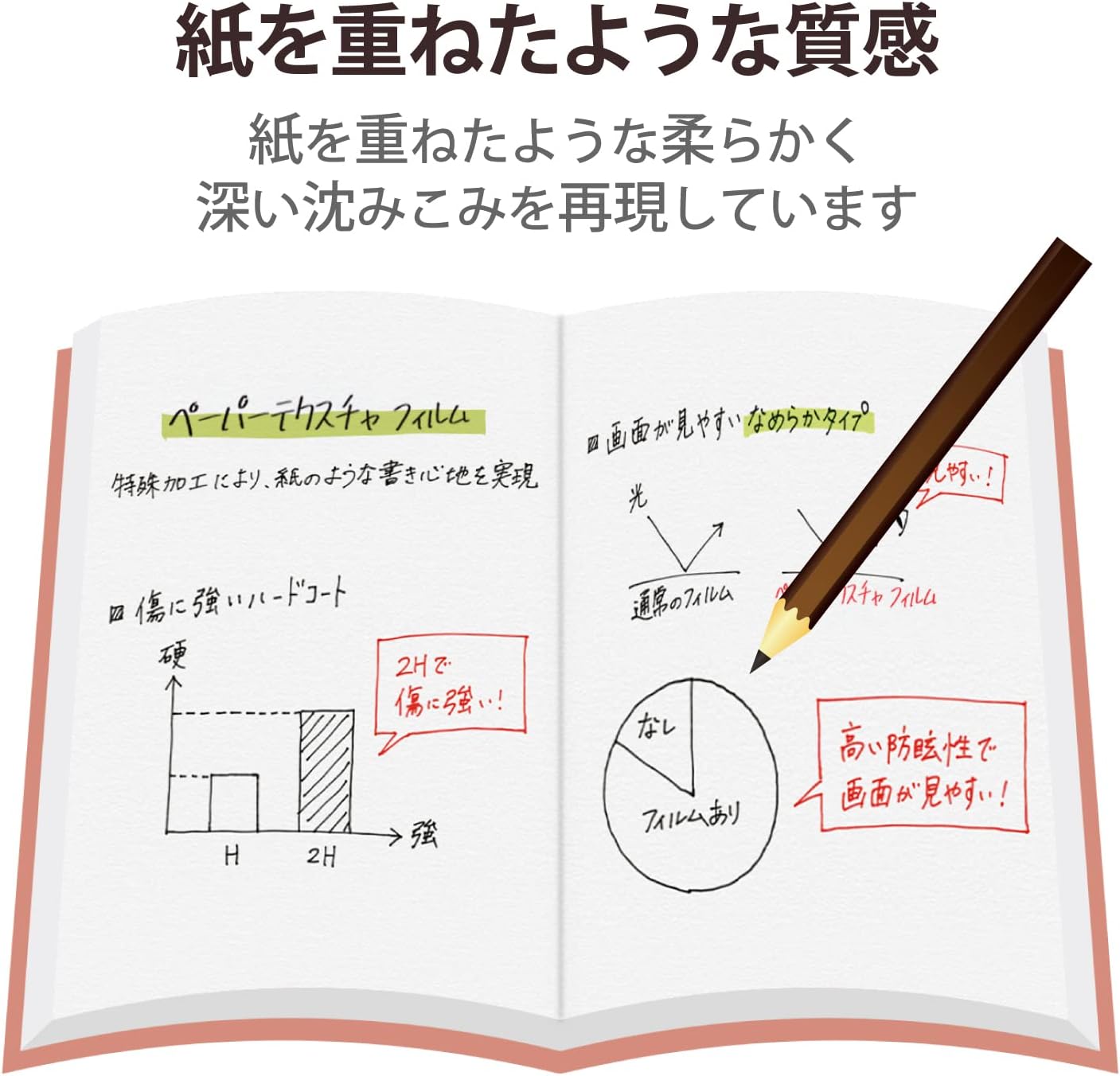
Specifications: ■Compatible with: iPad Pro 11 Inch (4th Generation) (2022 Model), iPad Air (5th Generation) (2022 Model), iPad Pro 11 Inch (3rd Generation) (2021 Model), iPad Air (4th Generation) (2020 Model), iPad Pro 11 Inch (2018 Model) ■Compatible Model Numbers: A2588, A2589, A2591, A2072, A2316, A2324, A2325, A1934, A1979, A1980, A2013, A2068, A2228, A22301, A2301, A2377, A2459, A231, A2301, A2301, A2459, A2301, A2301, A2301, A237, A2459, A2301, A2459. 2460 ■ Set Contents: LCD protective film (paper feeling, anti-reflection, smooth type for textures) x 1, dust removal sticker x 1, cleaning cloth x 1, spatula x 1. ■ Material: Adhesive Surface: Silicone, Outer: PET 【Description】 ■ iPad Pro 11 Inch (4th Generation) (2022 Model), iPad Air (5th Generation) (2022 Model), iPad Pro 11 Inch (3rd Generation) (2021 Model), iPad Air (4th Generation) (2020 Model), iPad Pro 11 Inch (2018) LCD Screen Protects from scratches and smudges,fingerprints This is a non-reflective type of paper feel film. ■ The special structure of this film is focused on "writing letter" that allows you to experience the proper amount of sinking of the pen. ■ With high anti-glare, this film is gentle on the eyes and is suitable for use with tablets indoors indoors to prevent fluorescent lights and screen flickering. ■ The effect is confirmed by a study with Professor Takashi Shibata at Tokyo Welfare University, specializing in ergonomics. - Airless type with a special suction layer that makes air bubbles stand out over time. ■ When there is small bubbles, you can squeeze it out with your fingers to remove the air bubbles. ■ Fingerprint prevention treatment prevents fingerprints and can be easily wiped off if left behind. ■Hard coat processing prevents scratches on the surface of the film. ■ Compatible with touchscreen inputs that allow you to operate the unit even with the film attached. ■ A self-adhesive type that can be applied with a silicone coating on the surface without using any adhesive or double-sided tape. Easy to apply and repositionable. ■ Pre-cut to fit the shape of your device, so it can be used immediately after removing it from the package. ■ Comes with a dedicated spatula, a cleaning cloth and a dust removal sticker for the film to be applied cleanly. Product inquiries Elecom General Information Center TEL. 0570-084-465 FAX. 0570-050-012 Reception Time / 10:00 - 19:00 24/7
- iPad Pro 11 Inch (4th Generation) (2022), iPad Air (5th Generation) (2022 Model), iPad Pro 11 Inch (3rd Generation) (2021 Model), iPad Air (4th Generation) (2020 Model), iPad Pro 11 Inch (2018 Model) LCD Screen. Anti-fingerprint, anti-smudge, anti-fingerprint Anti-reflection type paper feel film
- The special structure of this film is focused on "writing letter" that allows you to experience the proper amount of sinking of the pen
- High glare protection prevents fluorescent light glare and screen flickering, making this film ideal for indoor tablet devices
- Research with Professor Takashi Shibata at Tokyo Welfare University, specializing in ergonomics and has confirmed its effectiveness
- Airless type with a special suction layer that prevents air bubbles from noticing over time
| Color | Paper Texture Film |
|---|---|
| Clarity | 10 |
| Material | Silicone Polyethylene Terephthalate |
| Brand Name | ELECOM |
| Model Name | TB-A20MFLAPNS |
| Unit Count | 1 Piece |
| Finish Type | Matte |
| Part Number | TB-A20MFLAPNS |
| Screen Size | 10.9 Inches |
| Manufacturer | エレコム(ELECOM) |
| Model Number | TB-A20MFLAPNS |
| Item Hardness | 9H |
| Number of Items | 1 |
| Special Features | Paper texture |
| Compatible Devices | iPad Air 10.9 |
| Included Components | LCD protective film (paper feeling, anti-reflection specifications, smooth type for letters) x 1, dust removal sticker x 1, cleaning cloth x 1, spatula x 1 |
| Water Resistance Level | Not Water Resistant |
| Compatible Phone Models | A2588, A2589, A2591, A2072, A2316, A2324, A2325, A1934, A1979, A1980, A2013, A2068, A2228, A2230, A231, A23777, A24601, A24601, A2459, A24601, A2301, A24601, A2301, A237, A24601, A237, A2459, A24601, A2460, iPad Pro 11 Inch (4th Generation) (2022), iPad Air (5th Generation) (2022), iPad Pro 11 Inch (3rd Generation) (2021 Model), iPad Air (4th Generation) (2020 Model), iPad Pro 11 Inch (2018 Model) |
| Screen Surface Description | Matte |
| Compatible Tablet Computer Models | Apple iPad Air (4th generation), Apple iPad Air (5th generation), Apple iPad Pro 11-inch (1st generation), Apple iPad Pro 11-inch (2nd generation), Apple iPad Pro 11-inch (3rd generation), Apple iPad Pro 11-inch (4th generation) |




Bestseller ranking
Screen Protectors



Customers who viewed this product also viewed
Rod & Reel Combos




Correction of product information
If you notice any omissions or errors in the product information on this page, please use the correction request form below.
Correction Request Form