

Joystick Soldering Iron Kit, 90W Portable Solder Iron Pen with Soldering Tips for Gaming Controller Joystick Replacement, Adjustable Temperature with Digital Display
Product details
| Management number | 209983861 | Release Date | 2026/04/02 | List Price | $36.00 | Model Number | 209983861 | ||
|---|---|---|---|---|---|---|---|---|---|
| Category | |||||||||
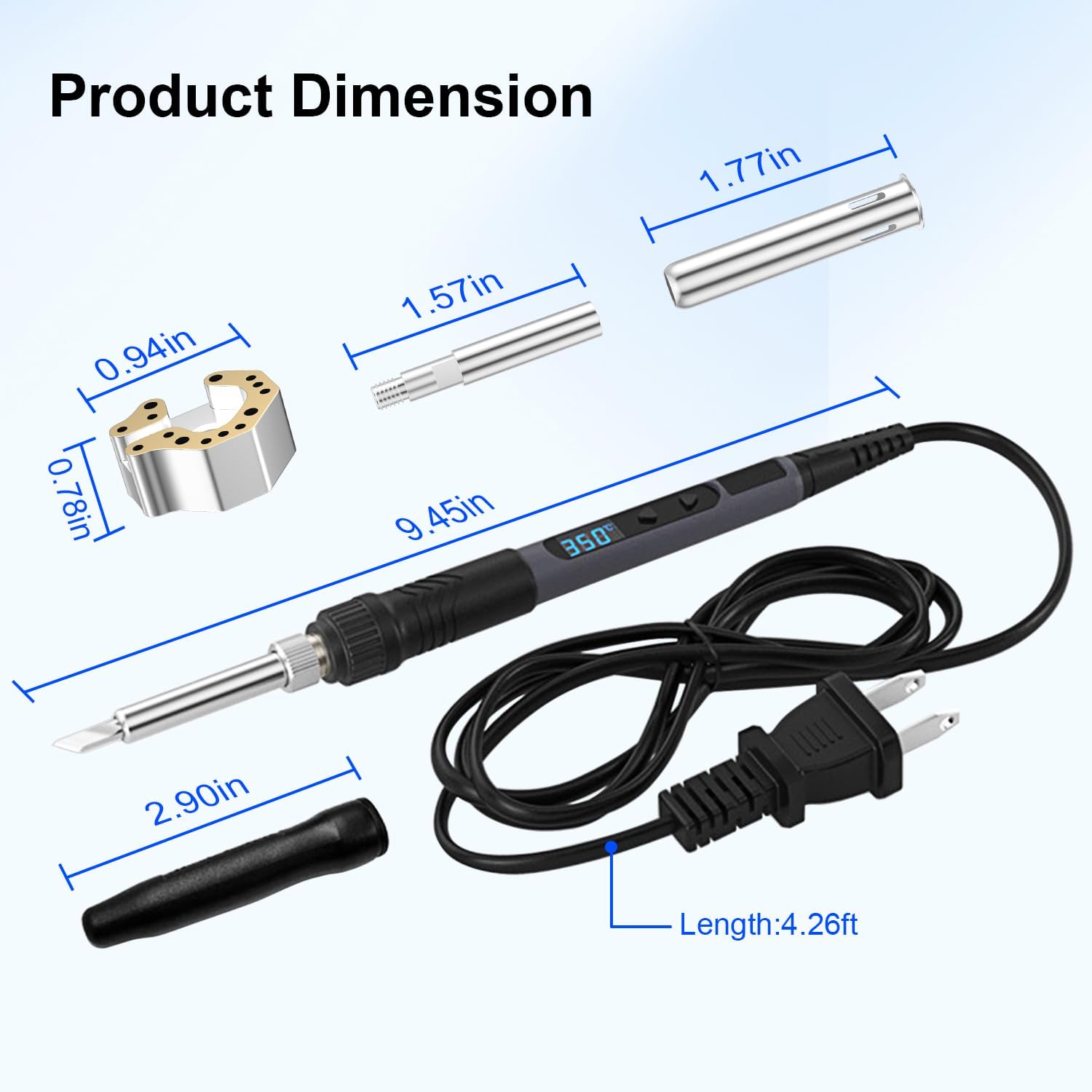
Aukuoy 90W Digital Soldering Iron Kit is an all-in-one tool designed for electronics repair and hobbyist projects. The Soldering Iron Kit functions as both a versatile general-purpose soldering iron and a dedicated repair tool for video game controllers. Its standout feature is the inclusion of a unique Joystick Soldering Iron Tip, engineered specifically for the safe removal and installation of analog joystick modules on Xbox/PS4/PS5/Switch Pro gaming comtrollers. How to Use: (1)For General Soldering Tasks: Plug in the iron, set your desired temperature (120°C - 550°C) using the digital display, and proceed with standard soldering techniques once heated. (2)For Game Controller Joystick Replacement: --The specialized tip is designed to simplify desoldering multi-pin joystick modules. Follow these steps: ①Preparation: Disassemble the game controller, and locate the faulty joystick and its solder points. ②Pre-tin the Joints: It is recommended to add a small amount of fresh solder to all the existing pins of the old joystick. This helps with overall heat distribution in the next step. ③Attach the Specialized Tool and Preheat: Install the provided Joystick Soldering Iron Tip onto the soldering pen. Preheat it to above 380℃ and please wait for 3 mintues for proper heat transfer. ④Heat & Removal: Place the joystick iron tip directly over the joystick module, covering all solder joints. Heat until the solder under all pins melts simultaneously, then gently take the old joystick away. ⑤Clean & Install: Clean any residual solder from the pads. Position the new joystick and solder it into place. Important Notes: - Safety First: Always operate in a well-ventilated area and use the provided stand. The tip is extremely hot during and after use; do not touch metal parts and keep away from flammable materials. - Compatibility: The specialized joystick soldering iron tip is designed for common modules found in Xbox, PS4, PS5, and Switch Pro controllers. Please verify your controller's internal layout is compatible before starting. - Temperature Adjustment: Referring to solder melting point and soldering guidelines for your controller's board, set an appropriate temperature and wait for proper heat transfer to the soldering iron tip. You can test the tip's temperature with the solder. If it melts easily, the soldering iron tip is ready for use. - Recommended Skill Level: Basic soldering knowledge is advised for best results, especially when working on delicate circuit boards. What's Included: ①90W Digital Soldering Iron Pen (with US Plug) ②Specialized Joystick Soldering Iron Tip ③User Manual
- 【All-in-One Versatile Kit】Aukuoy Soldering Iron Kit functions as both a versatile general-purpose soldering iron and a dedicated joystick repair tool, perfect for fixing Xbox/PS4/PS5/Switch Pro gaming controllers.
- 【90W Fast-Heating Power】This 90W soldering iron kit features an internal ceramic heating core for rapid heat-up and consistent, powerful performance across a wide range of soldering and repair tasks.
- 【Necessary Preheating】While using the Joystick Soldering Iron Tip for desoldering, please adjust temporature above the solder's melt point and wait for about 3 mintues for fully heat transfer to the tip.
- 【Smart Digital Display & Control】Easily monitor and precisely adjust the temperature from 120°C to 550°C with the clear LCD screen, ensuring the right heat for every job, from delicate electronics to controller repairs.
- 【Smart Auto-Sleep & Safety Design】Designed for safety and energy savings, the soldering iron automatically enters sleep mode after 30 minutes of continuous use. Simply click any button to wake it up instantly.
- 【Professional Sordering Iron Kit】Ideal for game controller maintenance, circuit board work, DIY projects, and household repairs, providing a professional solution in one package.
| Wattage | 90 watts |
|---|---|
| Brand Name | Aukuoy |
| Head Style | Pencil |
| Style Name | Pencil |
| Item Weight | 140 Grams |
| Manufacturer | Aukuoy |
| Model Number | BT298c |
| Power Source | Corded Electric |
| Heating Element | Ceramic |
| Additional Features | Easy Desoldering for Joystick, Heat Resistance Handles |
| Included Components | Joystick Soldering Iron Tip, Soldering Iron Pen |
| Manufacturer Part Number | BT298c |
| Upper Temperature Rating | 550 Degrees Celsius |
| Specific Uses For Product | DIY Handmade, Electronics Soldering, Joystick Desoldering |


Bestseller ranking
Smartwatch Necklaces


Customers who viewed this product also viewed
Irons


![8x8x8 LED Cube Kit DIY Electronic Kit Soldering Project Kit, User Needs to Solder The LED, and The Displayed Content Can Be Modified [3D8C-MULTI]](https://m.media-amazon.com/images/I/81P02MEpO0S._AC_SL1200_.jpg)
Correction of product information
If you notice any omissions or errors in the product information on this page, please use the correction request form below.
Correction Request Form